| At least I think it is. I pretty much finished interfacing the speedometer and RPM gauge into the iECU project. I knew those were going to be the hardest things to deal with so I went for those first. I figured if I wasn't able to display those then the whole thing wouldn't be very worthwhile. At first I was going to create a software routine to detect and calculate the pulses using the Arduino microcontroller but I decided to go a different route which will free up the controller for the many other things it will need to do. The first thing I thought of was building a little frequency to voltage converter. It would be easy for anyone to connect it to the back of the gauge cluster. I was wanting to build it this weekend but unfortunately the local electronics part distributer (Tritronics) which has the parts I need are closed on the weekends. Then I thought, wait a minute, why should I build this thing when the gauges themself already have that functionality. I searched out the data sheets for the chips on the speedometer and RPM boards and traced out where I needed to tap the voltages from. Both boards chips have a linear voltage output which is generated by the speed and RPM sensor inputs. I tapped a wire to each board and fed it to the microcontroller. After some corrective calculations in software I was able to sync everything together. Doing all this was the hardest part. Everything else is just a linear 0 to 5 volts or an on or off. Anyway, here is a link to a video I made of it on my "never used" YouTube channel for Nissan Data Voice. Someday I'll get around to posting videos of Nissan Data Voice too. In the video I only have signals going to and coming from the speedometer and RPM gauges. The other gauges have no signals so the app isn't displaying their readings correctly. [ http://www.youtube.com/watch?v=cTWE3s6F_s0 ] 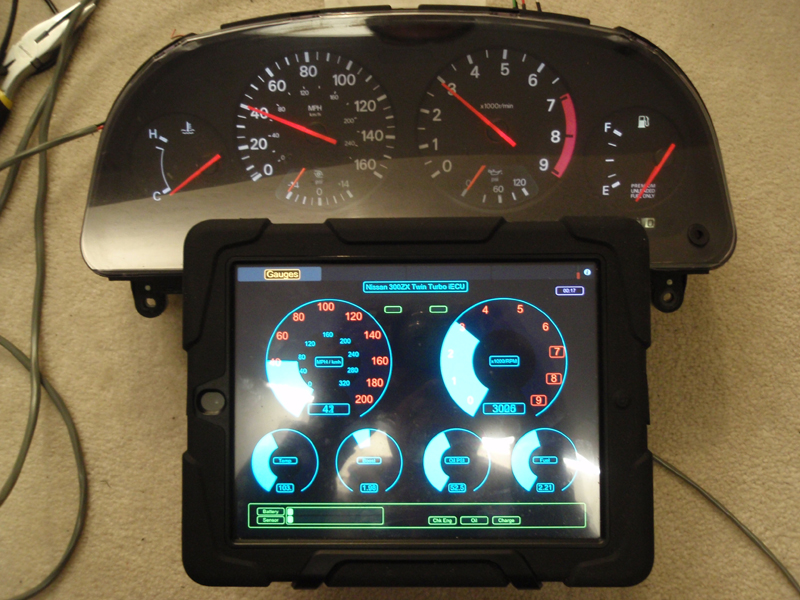
 www.mytwinturbo.com Nissan Data Voice - The first Nissan diagnostic software with a voice!
 Download my Nissan 300ZX Vin/Model Lookup. Watch an ECZA meet caravan! |


 The hardest part is over. -

