| I have been doing some research lately on how to datalog the AEM Uego wideband. Ive seen plenty of write up's and read the owners manual a good few times so here is a write up with pictures. This job is a job anyone can do.
HOW TO:
Log your Wideband via Serial Connection (AEM UEGO)
Parts Needed:
- Wideband O2 that has a serial datastream output, such as an AEM UEGO Tools Required:
- Electrical Tape
- Soldering Iron/Solder
- Wire Strippers
- Wire (I used 22 gauge) (Picture shows 18, it was to big)
- Logging Ability - Nistune ECT ECT...
- Serial Cable (Unless your adapter is part of it)
- Serial to USB Adapter with drivers 
Here are the instructions for the AEM UEGO. If you can understand this, then you don't need the how to, it's really that straight forward and that easy.


First thing you want to do is open the packaging, and take out the db9 serial as well as the 22 gauge wires. In the db9 connector it should come with supplied pin connectors, Install the wire connectors for the db9 onto the 22 gauge wires. (color is your choice, I went with red for the blue serial out put cable for the gauge and black for ground as pictured) Once connectors are on the wires it should look something like this.


Now take your db9 and flip it over so that the numbered end is facing up towards you. 
From there just install the correct wires into the correct pin locations, AEM Blue serial wire (in my case will be red as its the power/signal wire) goes into pin number 2 and the ground (black wire in my case) goes into pin 5. and should look like this when completed.

from there all you need to do is plug in your serial to usb converter to your datalogging db9 cable like so.
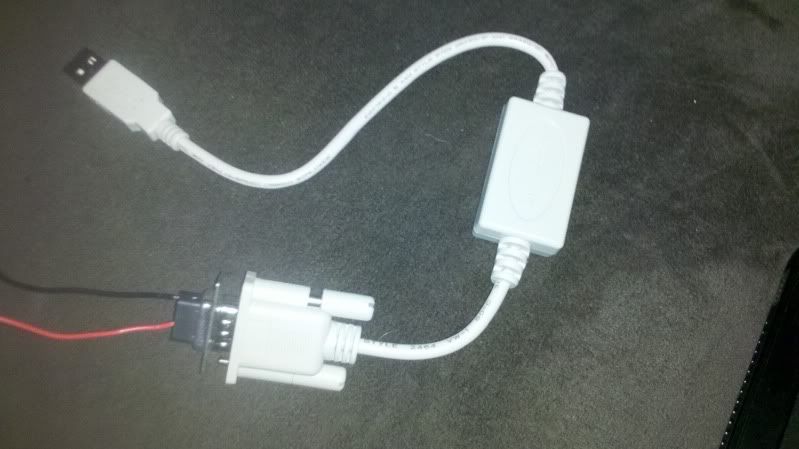
Once all is connected to the serial db9 you will then need to go out to the car and install the 22 gauge wires to the correct locations. Blue wire from AEM EUGO should be connected to your wire from pin 2 (my case red) and your black wire needs to be bolted down to a clean ground inside the car.
All thats left is Open Windows Device Manager. Find COM ports in the list and determine which one matches with your USB adapter. Select the appropriate COM number
Once everything is installed all thats left is to verify in your software like Nistune that everything is correct and enjoy!
Hope this helps those with AEM Uego's and the questions with datalogging.
 2006 Chevy Cobalt SS super charged (Daily driver/Gas saver)
1994 Nissan 300zx sport 700 Twin Turbo (Weekend car)
|


 DIY AEM UEGO Datalogging cable. -

